
Inspecting SQL Server TLS Certificates Without Credentials
If you’ve ever needed to check the TLS certificate on a SQL Server instance - whether it’s expired, misconfigured, missing SANs, or just plain self-signed - you’ve probably had to connect with SSMS, run some T-SQL, or dig through the Windows certificate store on the server itself. All of which require credentials you may not have, or access you’d rather not request through a change ticket.
I built sql-cert-inspector to solve that problem. It’s a single-file Windows executable that inspects the TLS certificate and Kerberos configuration of any SQL Server instance - without requiring SQL Server authentication.
How does it work without logging in?
The TLS handshake in the TDS protocol happens before the LOGIN packet. SQL Server presents its certificate during the PRELOGIN phase to establish the encrypted channel, and only then does it expect credentials. sql-cert-inspector simply disconnects after the handshake completes. No login attempt is ever made, no authentication is needed, and no audit trail is generated on the server.
This makes it safe to run against production instances you don’t have (or want) credentials for. It’s purely passive - it reads only what the server volunteers during the connection setup.
What does it actually show you?
Certificate details - Subject, Issuer, SANs, thumbprint (both SHA-1 and SHA-256), key algorithm and size, signature algorithm, validity dates, certificate version, key usage, enhanced key usage, and whether it’s self-signed or a CA certificate. Optionally, the full certificate chain including intermediate and root CAs.
Connection security - TLS protocol version, cipher suite, key exchange algorithm and strength, hash algorithm, SQL Server version, and encryption mode.
Certificate health checks - Automated warnings for:
- Expired certificates
- Certificates expiring within 30 days
- Self-signed certificates
- Hostname mismatches (the server’s hostname isn’t in the certificate’s SANs)
- Weak key sizes (RSA < 2048 bits)
- Deprecated signature algorithms (SHA-1, MD5)
Kerberos diagnostics - SPN registration lookup via LDAP, DNS forward/reverse validation, CNAME detection, and SPN account owner identification. This catches common Kerberos authentication failures before your users hit them - missing SPNs, duplicate registrations, DNS mismatches that silently force NTLM fallback.
Named instances and Availability Group listeners
Named instances are resolved automatically via the SQL Server Browser service on UDP 1434. You just pass --server myserver\INSTANCENAME and it handles the port lookup.
For AG listeners and other multi-subnet configurations, the tool resolves the hostname via DNS, and if multiple IP addresses come back, it races connections to all of them simultaneously - both the Browser UDP query and the TCP connection. This mirrors what MultiSubnetFailover=True does inside SqlClient, but it’s applied automatically. No flags to remember, no 21-second timeout surprises when the first IP in the DNS response points to the passive node.
See what your SQL Server is actually presenting to clients - no login required.
JSON output
The --json flag produces machine-readable output suitable for scripting, monitoring dashboards, or feeding into a certificate inventory pipeline. Every field shown in the console output has a corresponding JSON property.
|
1 |
sql-cert-inspector --server myserver\PROD --json | ConvertFrom-Json |
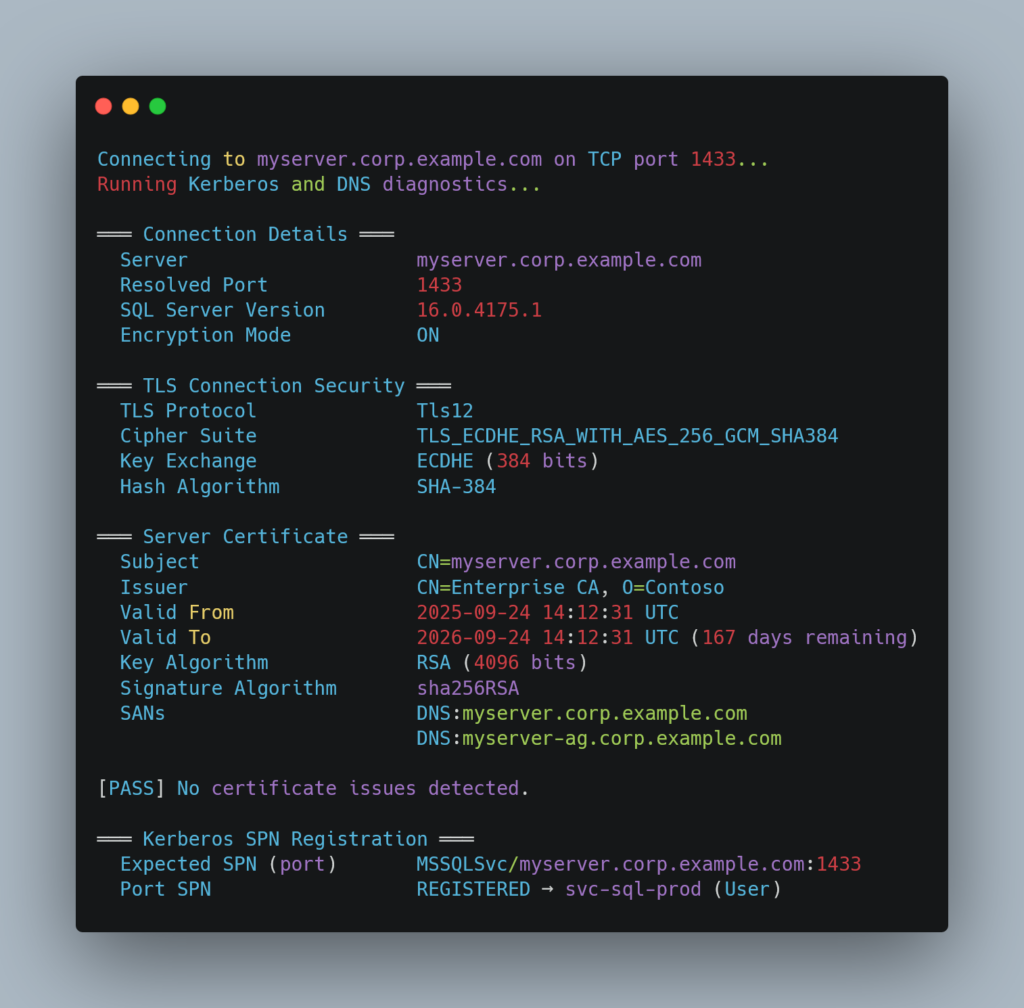
Sample output
|
1 2 3 4 5 6 7 8 9 10 11 12 13 14 15 16 17 18 19 20 21 22 23 24 25 26 27 28 29 30 |
Connecting to myserver.corp.example.com on TCP port 1433... Running Kerberos and DNS diagnostics... ═══ Connection Details ═══ Server myserver.corp.example.com Resolved Port 1433 SQL Server Version 16.0.4175.1 Encryption Mode ON ═══ TLS Connection Security ═══ TLS Protocol Tls12 Cipher Suite TLS_ECDHE_RSA_WITH_AES_256_GCM_SHA384 Key Exchange ECDHE (384 bits) Hash Algorithm SHA-384 ═══ Server Certificate ═══ Subject CN=myserver.corp.example.com Issuer CN=Enterprise CA, O=Contoso Valid From 2025-09-24 14:12:31 UTC Valid To 2026-09-24 14:12:31 UTC (167 days remaining) Key Algorithm RSA (4096 bits) Signature Algorithm sha256RSA SANs DNS:myserver.corp.example.com DNS:myserver-ag.corp.example.com [PASS] No certificate issues detected. ═══ Kerberos SPN Registration ═══ Expected SPN (port) MSSQLSvc/myserver.corp.example.com:1433 Port SPN REGISTERED → svc-sql-prod (User) |
Where this has been useful for me
I originally wrote this to audit TLS certificates across a fleet of SQL Server instances after a certificate renewal went sideways - a replacement cert was missing a SAN entry for an AG listener, causing TLS validation failures for applications using Encrypt=Mandatory. The tool caught the mismatch immediately from a workstation, without needing RDP access to the server or credentials to the instance.
It’s also been useful for:
- Verifying certificate deployments after renewals
- Confirming Kerberos SPN registration before going live with a new instance
- Diagnosing “certificate not trusted” errors from application servers
- Checking whether
Force Encryptionis actually enabled - Auditing cipher suites and TLS versions across environments
Getting it
Grab the latest release from GitHub - it’s a single self-contained .exe, no .NET runtime needed. Or clone the repo and build from source if you prefer.
The project is MIT-licensed and written in C# / .NET 9. Contributions welcome - there’s a CONTRIBUTING.md with the details.