
Logins, SIDs, and Kerberos from First Principles, Part 8: Auditing Logins with Service Broker
The series so far has answered who can connect (part 5 showed even that requires asking Windows) and how they prove it (part 6 and part 7). The closing question is who actually does. Group-based access means the catalog cannot tell you; point-in-time audits age immediately; and when someone asks “is anything still using this login?” before a decommission, you need history, not a snapshot.
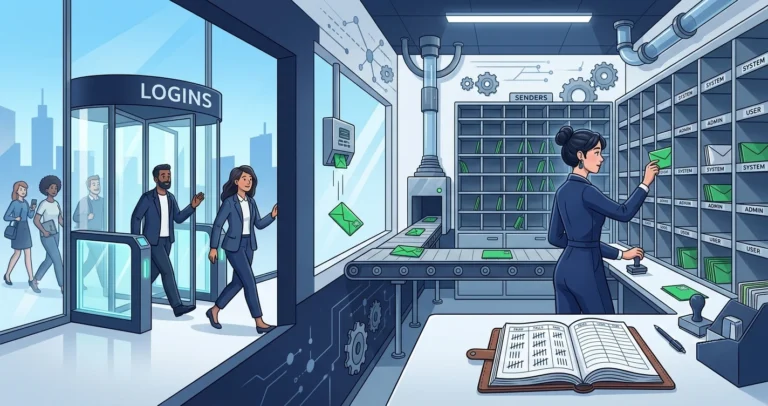
SQL Server has several ways to capture logins: SQL Server Audit, Extended Events, login triggers. This post uses a fourth that deserves more attention: event notifications delivered through Service Broker. The pipeline is fully asynchronous (a slow consumer never delays a login the way a login trigger can), survives restarts, is queryable with plain T-SQL, and works on every edition back to 2005. Demos ran against SQL Server 2025 (RTM); everything works identically on 2019 and far earlier.
The Architecture in One Paragraph
An event notification subscribes to a server-level event, here AUDIT_LOGIN, which fires for every successful connection.[1] Each occurrence is serialized to XML and dropped onto a Service Broker queue as a message. Messages accumulate durably until something reads them with RECEIVE: an activation procedure for continuous processing, or an ad-hoc query when you get around to it. The login that triggered the event never waits on any of this.
Building the Pipeline
A dedicated database holds the queue and the audit tables:
|
1 2 3 4 5 6 7 8 9 10 11 12 13 14 15 16 17 18 |
CREATE DATABASE [login_audit]; GO ALTER DATABASE [login_audit] SET ENABLE_BROKER; GO USE [login_audit]; GO CREATE QUEUE [dbo].[login_audit_queue]; GO CREATE SERVICE [login_audit_service] ON QUEUE [dbo].[login_audit_queue] ( [http://schemas.microsoft.com/SQL/Notifications/PostEventNotification] ); GO |
The service contract name is fixed: event notifications only deliver to services bound to the PostEventNotification contract. Then the subscription itself, a server-scoped object:[2]
|
1 2 3 4 5 6 7 8 9 10 11 |
CREATE EVENT NOTIFICATION [capture_logins] ON SERVER FOR AUDIT_LOGIN TO SERVICE N'login_audit_service', N'current database'; GO SELECT [name] , [parent_class_desc] FROM [sys].[server_event_notifications]; |
|
1 2 3 |
name parent_class_desc -------------- ----------------- capture_logins SERVER |
That is the entire capture side: a database, a queue, a service, and one subscription. From this moment, every successful login enqueues a message.
Reading the Evidence
Connect once with a SQL login to generate an event, then RECEIVE from the queue[3] and shred the XML:
|
1 2 3 4 5 6 7 8 9 10 11 12 13 |
DECLARE @msg xml; RECEIVE TOP (1) @msg = CONVERT(xml, [message_body]) FROM [dbo].[login_audit_queue]; SELECT @msg.value('(/EVENT_INSTANCE/EventType)[1]', 'sysname') AS [event] , @msg.value('(/EVENT_INSTANCE/LoginName)[1]', 'sysname') AS [login_name] , @msg.value('(/EVENT_INSTANCE/HostName)[1]', 'sysname') AS [host] , @msg.value('(/EVENT_INSTANCE/ApplicationName)[1]', 'sysname') AS [app] , @msg.value('(/EVENT_INSTANCE/PostTime)[1]', 'datetime2(0)') AS [post_time]; |
|
1 2 3 |
event login_name host app post_time ----------- ---------- ------------- ------ ------------------- AUDIT_LOGIN fleet_app WORKSTATION01 SQLCMD 2026-07-24 10:34:02 |
There is the migrated login from part 3, captured connecting, with the host and application it came from. The EVENT_INSTANCE XML also carries the SPID, the target database, and whether the connection was pooled.
One syntax landmine worth knowing before you script this: the XML value() method requires QUOTED_IDENTIFIER ON, and sqlcmd sets it OFF by default. If your receive script works in Management Studio but throws Msg 1934 from a scheduled job or the command line, add -I to sqlcmd (or SET QUOTED_IDENTIFIER ON; at the top of the script).
From Demo to Production
Ad-hoc RECEIVE proves the pipeline; a real deployment adds a consumer and a destination. The shape that has worked well for me:
- An activation procedure on the queue receives messages in batches inside a transaction, shreds them, and writes to audit tables. Activation starts the procedure only when messages exist, so an idle instance does zero audit work.
- Normalize the storage. Login events are massively repetitive: the same logins from the same hosts running the same applications, thousands of times a day. Dimension tables for login names, hosts, and applications, with a fact table of (dimensions + first_seen + last_seen + counter), keep years of history in megabytes. An
UPDATE ... IF @@ROWCOUNT = 0 INSERTupsert per event against the aggregate table is enough. - Capture failures too.
AUDIT_LOGIN_FAILEDis a sibling event type; one more event notification into the same queue gives you failed-attempt history, which is the more interesting dataset for security review. - Poison-message handling: five consecutive transaction rollbacks disable a queue. The activation procedure should catch shredding errors and dead-letter malformed messages rather than rolling back.
Costs and caveats, honestly stated:
- One row per login is real work on connection-storm workloads. An application without connection pooling can generate millions of events daily. The asynchronous design means logins do not slow down, but the queue grows and the consumer has to keep up; watch
sys.transmission_queueand the queue depth. - Event notifications capture successful logins only at the audit level: they tell you who connected, not what they did. Statement-level requirements belong to SQL Server Audit or Extended Events.
- The subscription is server-scoped but the queue is in a user database. Drop or restore that database carelessly and events route to nowhere;
sys.transmission_queuein msdb quietly accumulates the undeliverables.
Answering the Decommission Question
With the aggregate table in place, the question that motivates all of this, “is anything still using this login?”, becomes a query:
|
1 2 3 4 5 6 7 8 9 10 11 12 13 |
SELECT [login_name] , [host] , [app] , [first_seen] , [last_seen] , [login_count] FROM [dbo].[login_history] WHERE [login_name] = N'fleet_app' ORDER BY [last_seen] DESC; |
Six months of silence in last_seen is evidence you can decommission on. A single row from yesterday, from a host nobody recognizes, is a different kind of finding, and either way you know, instead of guessing.
Series Wrap-Up
Eight parts, one through-line: names are labels; SIDs, tickets, and events are the truth. SIDs are the real identity; recreated accounts are strangers wearing old names; logins and permissions migrate intact only when you carry the underlying values; group members are invisible until you ask Windows; Kerberos fails silently into NTLM; even Kerberos can be running on a 1987 cipher; and continuous capture beats point-in-time guessing. Every demo in the series is reproducible with two instances and a local Windows account, no domain required.
What would you audit next with this pipeline? I would love to hear about it in the comments, or find me on Bluesky or LinkedIn.
References
- Event notifications - Microsoft Learn. Architecture, the PostEventNotification contract, and available event types. ↩
- CREATE EVENT NOTIFICATION (Transact-SQL) - Microsoft Learn. Server-scoped subscriptions and service routing. ↩
- RECEIVE (Transact-SQL) - Microsoft Learn. Reading and consuming Service Broker messages. ↩