
Backup & Recovery from First Principles, Part 1: Recovery Models Actually Explained
Every SQL Server database has a recovery model, and most databases got theirs by inheritance rather than by decision: whatever model had at CREATE DATABASE time is what you are running today. That default determines what your transaction log retains, which backup types are even possible, and how much data you can lose in a disaster. It deserves a decision.
This post is part of the Backup & Recovery from First Principles series. The contents page lists every part in order.
This is part 1 of a series that builds backup and recovery up from first principles. Later parts cover what is actually inside a backup, the log chain, copy-only backups, and restore sequences. Everything below was run against SQL Server 2019 (CU32) and cross-checked on SQL Server 2025 (RTM), with the scripts included so you can reproduce it. Log-space numbers shown are from 2019; 2025 produced the same figures within a fraction of a megabyte.
What a Recovery Model Actually Controls
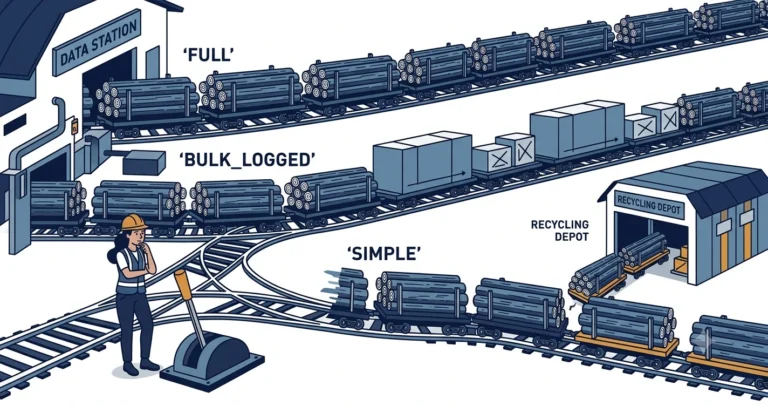
A recovery model controls exactly one thing: when the transaction log can be truncated, meaning when the space inside the log file can be reused.[1] Everything else, what backups you can take, what restores you can perform, how much log the file accumulates, falls out of that one rule.
| Model | Log truncates on… | Log backups | Point-in-time restore |
|---|---|---|---|
| SIMPLE | checkpoint | not allowed | no |
| FULL | log backup | required | yes |
| BULK_LOGGED | log backup | required | yes, except across minimally logged operations |
The transaction log itself works identically in all three models. Every data modification is logged, always. SIMPLE recovery does not mean “not logged”; it means the log records are thrown away at the next checkpoint instead of being retained for a log backup. If you have ever seen a huge transaction bloat the log file of a SIMPLE database, you have seen this firsthand: checkpoints truncate the log in SIMPLE recovery, but only past the oldest active transaction.
Watching the Models Behave
A demo database with a 2 GB log (pre-sized so autogrowth does not pollute the numbers) and a table we can flood with rows:
|
1 2 3 4 5 6 7 8 9 10 11 12 13 14 15 16 17 18 19 20 21 |
USE [master]; DROP DATABASE IF EXISTS [bkrec_demo]; CREATE DATABASE [bkrec_demo]; ALTER DATABASE [bkrec_demo] SET RECOVERY SIMPLE; ALTER DATABASE [bkrec_demo] MODIFY FILE (NAME = N'bkrec_demo_log', SIZE = 2048MB); GO USE [bkrec_demo]; GO CREATE TABLE [dbo].[stage] ( [id] int NOT NULL IDENTITY(1, 1) , [payload] char(400) NOT NULL DEFAULT (REPLICATE('x', 400)) , CONSTRAINT [pk_stage] PRIMARY KEY CLUSTERED ([id]) ); GO |
SIMPLE: the Log Recycles Itself
Insert a million 400-byte rows, then look at log usage before and after a manual checkpoint:
|
1 2 3 4 5 6 7 8 9 10 11 12 13 14 15 16 17 18 19 |
INSERT INTO [dbo].[stage] ([payload]) SELECT TOP (1000000) REPLICATE('x', 400) FROM [sys].[all_columns] AS [ac1] CROSS JOIN [sys].[all_columns] AS [ac2]; SELECT CONVERT(decimal(10,2), [used_log_space_in_bytes] / 1048576.0) AS [log_used_mb] FROM [sys].[dm_db_log_space_usage]; CHECKPOINT; SELECT CONVERT(decimal(10,2), [used_log_space_in_bytes] / 1048576.0) AS [log_used_mb] FROM [sys].[dm_db_log_space_usage]; |
|
1 2 |
log_used_mb (after insert): 48.83 log_used_mb (after checkpoint): 40.98 |
The log never accumulated much in the first place because checkpoints were firing automatically during the insert, recycling log space as they went. That is SIMPLE recovery doing its job: minimal administration, minimal log growth, and zero ability to restore to any point other than a full or differential backup.
FULL Without a Full Backup Is Just SIMPLE with Extra Steps
Here is the part that surprises people. Switch the database to FULL recovery and repeat the million-row insert, without taking a full backup first:
|
1 2 3 4 5 6 7 8 9 10 11 12 13 |
ALTER DATABASE [bkrec_demo] SET RECOVERY FULL; GO /* ...same million-row insert... */ CHECKPOINT; SELECT CONVERT(decimal(10,2), [used_log_space_in_bytes] / 1048576.0) AS [log_used_mb] FROM [sys].[dm_db_log_space_usage]; SELECT [log_reuse_wait_desc] FROM [sys].[databases] WHERE [name] = N'bkrec_demo'; |
|
1 2 |
log_used_mb: 86.63 log_reuse_wait_desc: NOTHING |
The checkpoint still truncated the log, and log_reuse_wait_desc says the log is waiting on NOTHING. A database in FULL recovery behaves exactly like SIMPLE until the first full backup establishes a base for the log chain. This state is sometimes called pseudo-simple. If you flip a database to FULL and never take that first full backup, you have gained nothing but a false sense of security. I have written before about detecting databases in FULL recovery with no log backups; this is the even sneakier cousin.
FULL with a Base: Now the Log Waits for You
Take the full backup, then repeat the insert:
|
1 2 3 4 5 6 7 8 9 10 11 12 13 |
BACKUP DATABASE [bkrec_demo] TO DISK = N'C:\temp\bkrec\bkrec_base.bak' WITH INIT, COMPRESSION; GO /* ...same million-row insert... */ CHECKPOINT; SELECT CONVERT(decimal(10,2), [used_log_space_in_bytes] / 1048576.0) AS [log_used_mb] FROM [sys].[dm_db_log_space_usage]; SELECT [log_reuse_wait_desc] FROM [sys].[databases] WHERE [name] = N'bkrec_demo'; |
|
1 2 |
log_used_mb: 642.56 log_reuse_wait_desc: LOG_BACKUP |
Same insert, same checkpoint, completely different outcome: 642 MB of log held hostage, and the database tells you why: LOG_BACKUP. In FULL recovery with an established base, only a log backup releases log space:
|
1 2 3 4 5 6 |
BACKUP LOG [bkrec_demo] TO DISK = N'C:\temp\bkrec\bkrec_log1.trn' WITH INIT, COMPRESSION; SELECT CONVERT(decimal(10,2), [used_log_space_in_bytes] / 1048576.0) AS [log_used_mb] FROM [sys].[dm_db_log_space_usage]; |
|
1 |
log_used_mb: 5.24 |
That retained log is not waste. It is the raw material for point-in-time restore, which part 5 demonstrates end to end. The price of being able to rewind to 2:47:13 PM is keeping every log record until a log backup carries it to safety.
BULK_LOGGED: the Asterisk Model
BULK_LOGGED promises FULL-like behavior with minimal logging for bulk operations (SELECT INTO, BULK INSERT, index builds).[2] The demo makes the trade-off concrete. A SELECT INTO of the million-row table under each model:
|
1 2 3 4 5 6 7 |
/* BULK_LOGGED */ SELECT [id], [payload] INTO [dbo].[stage_bulk] FROM [dbo].[stage]; /* log used: 10.85 MB */ /* FULL */ SELECT [id], [payload] INTO [dbo].[stage_full] FROM [dbo].[stage]; /* log used: 453.56 MB */ |
Under BULK_LOGGED the operation wrote 10.85 MB of log; under FULL, 453.56 MB. A forty-fold reduction in log volume sounds fantastic until you see what the log backup does about it:
|
1 2 3 4 |
/* log backup after the BULK_LOGGED SELECT INTO */ Processed 52688 pages for database 'bkrec_demo', file 'bkrec_demo' on file 1. Processed 721 pages for database 'bkrec_demo', file 'bkrec_demo_log' on file 1. BACKUP LOG successfully processed 53409 pages... |
Look at the first line: the log backup read 52,688 pages from the data file. A log backup after a minimally logged operation must grab the actual extents the operation touched, because the log does not contain the row data. The log backup is nearly as large as it would have been under FULL; you saved log file space during the operation, not backup size. And the sharper edge: you cannot restore that log backup to a point in time within the interval containing the bulk operation. It is all-or-nothing for that backup. Paul Randal’s myth-busting piece on BULK_LOGGED covers the corner cases well.[3]
Choosing Deliberately
The decision is simpler than the documentation makes it look:
- Can the business tolerate losing everything since the last full or differential backup? If yes, SIMPLE is honest and low-maintenance. If no, FULL, plus actual log backups on a schedule tighter than your data-loss tolerance.
- BULK_LOGGED is a temporary state, not a home. Switch in for a large planned load, take a log backup immediately before and after, switch back. Living in BULK_LOGGED means every log backup potentially carries the point-in-time asterisk.
- FULL without log backups is the worst of both worlds: either the log grows until the disk fills, or the database silently sits in pseudo-simple with no restore chain at all.
Next up: part 2 opens up the backup file itself - what full, differential, and log backups actually contain, and how the LSN chain in msdb ties them together.
Questions about a recovery model choice you inherited? I would love to hear about it in the comments, or find me on Bluesky or LinkedIn.
References
- Recovery Models (SQL Server) - Microsoft Learn. The authoritative description of SIMPLE, FULL, and BULK_LOGGED and the operations each supports. ↩
- The Transaction Log (SQL Server) - Microsoft Learn. How the log works, truncation, and minimal logging. ↩
- A SQL Server DBA myth a day: (28/30) BULK_LOGGED recovery model - Paul Randal, SQLskills. Myths and corner cases of BULK_LOGGED, including log backup size and point-in-time limitations. ↩