
SQL Server HA and DR Options: A Field Guide
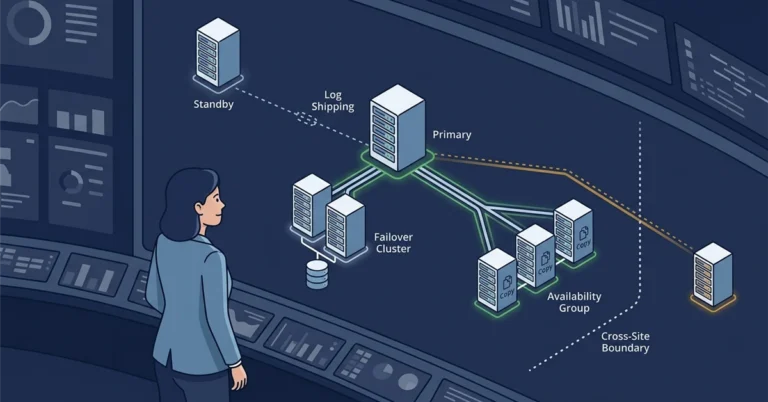
Somebody says “we need high availability” and everyone in the room nods, because everyone is picturing something different. One person means “the database survives a server reboot.” Another means “we can lose the whole datacenter and keep running.” A third just wants a read-only copy so reports stop hammering production. Those are three different problems, and SQL Server has a different tool for each, plus a few that overlap and a couple that are quietly on their way out.
This post is a field guide to the built-in options: log shipping, replication, database mirroring, failover cluster instances, and the whole Always On availability group family including basic and distributed groups. For each one I will cover what it actually protects, whether it is synchronous or asynchronous, whether failover is automatic, whether you get a readable copy, which edition you need, and how it has changed across SQL Server 2016 through 2025. The goal is that the next time someone says “we need HA,” you can ask the two questions that actually matter and land on the right tool.
The two questions that decide everything
Before comparing features, get these two numbers from the business, because they eliminate most of the options immediately.
RPO, the recovery point objective, is how much data you can afford to lose, measured in time. RPO of zero means not a single committed transaction can be lost, which forces a synchronous option. RPO of “a few minutes” opens the door to cheaper asynchronous approaches.
RTO, the recovery time objective, is how long you can be down during a failover. RTO of seconds forces automatic failover. RTO of “an hour is fine” lets a human run a manual failover, which is simpler and cheaper to operate.
Everything below is really just trade-offs between those two numbers, the edition you are licensed for, and how much operational complexity you are willing to carry. It also helps to keep two words straight: high availability is about surviving a local failure quickly (a dead node, a failed service), while disaster recovery is about surviving the loss of a whole site. Some features do one, some do the other, and a few do both.
Log shipping
Log shipping is the oldest and simplest option, and it is still a perfectly good answer. It works at the database level: a SQL Server Agent job backs up the transaction log on the primary, another copies the file to one or more secondaries, and a third restores it. That is the entire mechanism, and its simplicity is the point. There is nothing to cluster and almost nothing to break.
It is asynchronous by nature, so your RPO is roughly the log-backup interval plus copy time, typically a handful of minutes. Failover is manual: you finish restoring the last logs, recover the database, and repoint the application. A secondary can be left in STANDBY mode for read-only reporting, though restores kick readers out unless you schedule around them. You can ship one database to several secondaries, in different sites, which makes it a cheap disaster-recovery option as well. The built-in log shipping feature is driven by SQL Server Agent jobs, so it is available on Enterprise, Standard, and Web, but not Express, which has no Agent. Strictly speaking the underlying mechanism, back up the log, copy the file, restore it, works on any edition if you schedule it yourself with Task Scheduler or a script; what Express lacks is the built-in, Agent-driven tooling, not the ability to move a log backup around.
Reach for log shipping when your RPO and RTO are measured in minutes, when you want dead-simple operations, or when you need a cheap warm standby in another site and do not want the ceremony of a cluster.
Replication
Replication is the odd one out, because it is really a data-distribution technology that gets pressed into high-availability duty. Instead of protecting a whole database as a unit, it moves individual articles (tables, or even subsets of rows and columns) from a publisher to one or more subscribers. The main flavours are snapshot, transactional, merge, and peer-to-peer, with peer-to-peer being an Enterprise-only feature.
Transactional replication can keep a near-real-time readable copy of selected tables, which is genuinely useful for offloading reads or feeding a reporting system. What it is not is a clean failover story: there is no automatic failover, schema changes need care, and it replicates objects rather than guaranteeing a byte-identical database. Treat replication as the right tool when you need a filtered, always-queryable copy of part of a database, and reach for something else when you need the whole database to fail over as a unit.
Database mirroring (legacy)
Database mirroring predates availability groups and has been deprecated since SQL Server 2012, though it still ships in current versions. It protects a single database with one mirror copy. In high-safety (synchronous) mode with a witness it can fail over automatically; high-performance (asynchronous) mode is Enterprise only and fails over manually. The mirror is not directly readable without a database snapshot on top of it.
I mention it mainly so you recognize it in older environments. For anything new, its replacements are cleaner: basic availability groups on Standard edition, or full availability groups on Enterprise. Do not build a new solution on mirroring.
Failover cluster instances
An Always On failover cluster instance (FCI) is the one option here that protects at the instance level rather than the database level. The whole SQL Server instance, its logins, agent jobs, and all its databases, moves between nodes as a unit. The trick is that the nodes share one copy of the storage (a SAN, Storage Spaces Direct, or an SMB share), so there is exactly one set of data files and the passive node simply picks them up on failover.
Because the storage is shared, RPO is effectively zero and failover is automatic, with an RTO of the time it takes the instance to start and recover on the other node, usually well under a minute. There is no readable secondary; the passive node is passive. The important caveat is what an FCI does not protect against: it guards against node failure, not against storage failure or database corruption, because there is only one copy of the data. For that reason FCIs are often combined with an availability group or log shipping for off-box redundancy. FCIs run on Enterprise (up to 16 nodes) and Standard (limited to two nodes).
Basic availability groups
Basic availability groups arrived in SQL Server 2016 as the Standard-edition replacement for database mirroring, and they behave much like it. A basic group protects a single database with exactly two replicas, a primary and one secondary, in either synchronous or asynchronous mode, with automatic or manual failover. The secondary is not readable and cannot serve backups; it just sits there waiting to take over.[2] A basic group exists to deliver automatic failover for that one database, and automatic failover needs a cluster manager underneath to detect the failure and promote the secondary, so a basic group sits on a Windows Server Failover Cluster (or Pacemaker on Linux). That cluster dependency is the point, not an inconvenience: strip it out and you have thrown away the automatic failover that was the only reason to choose a basic group over plain log shipping.
This is the natural high-availability choice on Standard edition for a single important database. When you outgrow “one database, one standby,” you are looking at Enterprise and full availability groups.
Always On availability groups
Full availability groups are the flagship high-availability and disaster-recovery feature, and they are Enterprise edition only. A group protects a set of databases that fail over together, with one primary replica and up to eight secondary replicas.[1] Each secondary can optionally be made readable and can offload certain backups, which is how availability groups do double duty as a read-scale solution. On Windows the group lives on a Windows Server Failover Cluster; on Linux it uses Pacemaker.
Each replica runs in either synchronous-commit mode (RPO zero, eligible for automatic failover) or asynchronous-commit mode (a small RPO, manual failover, typically used for a remote DR replica). The number of synchronous replicas grew over time, which is the main version-to-version difference worth knowing: SQL Server 2016 and 2017 support up to three synchronous-commit replicas, and SQL Server 2019 raised that to five. The eight-secondary ceiling has held since 2016.
Availability groups are the answer when you need automatic failover with a zero-RPO local replica and an asynchronous replica in another site, or when you want readable secondaries to offload reporting, all from the same feature. The cost is operational complexity and an Enterprise license.
Distributed availability groups
A distributed availability group, also from SQL Server 2016, is an availability group of availability groups. It spans two separate groups, each with its own cluster, and crucially it configures nothing in either underlying cluster; the whole relationship is maintained inside SQL Server.[3] Because of that, the two groups can sit in different domains, different datacenters, even different operating systems, so a Windows group can replicate to a Linux group. Each participating group needs a listener, and the link between them is usually asynchronous. A single distributed group joins exactly two availability groups, but that is not the ceiling on topology: you can daisy-chain distributed groups, and even run two of them from the same availability group, to fan replication out to more sites than a single pair.
That architecture makes distributed groups the go-to for multi-site disaster recovery, cross-platform replication, and near-zero-downtime migrations, including rolling upgrades between SQL Server versions. They are Enterprise-edition territory since they are built on availability groups. I have written a deeper walkthrough of the architecture, failover flow, and the parts that bite people in distributed availability groups: architecture, failover, and the gotchas nobody mentions, and a scripted, gated failover approach in the DAG failover toolkit.
Read-scale (clusterless) availability groups
SQL Server 2017 added a variant worth calling out on its own, because it is easy to reach for and easy to misunderstand: the read-scale availability group, created with CLUSTER_TYPE = NONE. It is an availability group with no Windows Server Failover Cluster and no Pacemaker underneath it, available on both Windows and Linux. The appeal is obvious: if all you want is to offload reporting and analytics to one or more readable secondaries, standing up and operating a full cluster is a lot of overhead for a benefit you were not going to use.[5]
The catch is in the name. It is a read-scale feature, not a high-availability one, and Microsoft’s documentation is blunt about it: there is no infrastructure to monitor for failures, coordinate, or fail over automatically. Without a cluster, nothing arbitrates quorum, nothing detects that the primary has stopped, and nothing promotes a secondary for you. That has real consequences you should weigh before choosing it:
- No automatic failover. Failover is a manual operation you perform by hand, so your RTO is however long it takes a human to notice, decide, and act, not the seconds an automated cluster delivers.
- Forced failover, with a data-loss warning built into the syntax. There is no graceful “fail over now” for a clusterless group. The documented way to promote a secondary is to take the group offline on the old primary and run
ALTER AVAILABILITY GROUP [name] FORCE_FAILOVER_ALLOW_DATA_LOSS;. The command says exactly what it does. If the replica was in synchronous-commit mode and had actually synchronized, you get away with it cleanly; if it was asynchronous, or synchronous but not yet caught up, you lose whatever had not arrived. That is a lot of foot-gun to hand someone for a routine failover. - No cluster-managed listener behaviour. You still route reads with read-only routing or by connecting to a secondary directly, but there is no cluster to move a listener or reroute writes on failure the way a real HA availability group does.
- Cluster DMV columns become noise. The availability-group DMVs report an internal default cluster, and those columns are for internal use only, which makes ordinary health-check queries more confusing to read.
So a read-scale group can genuinely serve as a disaster-recovery copy when its replicas are synchronous (RPO zero), but Microsoft’s own documentation could not be clearer that it is not high availability: “This isn’t a high-availability setup. There’s no infrastructure to monitor and coordinate failure detection and automatic failover … If you need high-availability capabilities, use a cluster manager.”[6] To get anything resembling HA out of a clusterless group you would have to bolt on your own monitoring and automation to detect a failure and issue that forced failover, which is to say you would be rebuilding, badly, the cluster manager you opted out of. If you find yourself wanting automatic failover after deploying one, you do not tweak it; you rebuild it on a cluster. Treat CLUSTER_TYPE = NONE as “read scale-out, plus manual disaster recovery,” and nothing more.
The comparison at a glance
Here is the whole field on one page. “Protects” is the unit that fails over; “auto failover” means the feature can fail over without a human; “readable copy” means you can query the secondary.
| Option | Protects | Sync or async | Auto failover | Readable copy | Minimum edition |
|---|---|---|---|---|---|
| Log shipping | Database | Async | No | Yes (standby) | Web |
| Replication | Articles (tables/rows) | Both | No | Yes | Standard (P2P: Enterprise) |
| Database mirroring (legacy) | Database | Both | Yes (sync + witness) | No (snapshot only) | Standard (async: Enterprise) |
| Failover cluster instance | Instance | Shared storage | Yes | No | Standard (2 nodes) |
| Basic availability group | Single database | Both | Yes | No | Standard |
| Availability group | Group of databases | Both | Yes (sync) | Yes (optional) | Enterprise |
| Distributed availability group | Two availability groups | Usually async | No (manual between groups) | Yes | Enterprise |
A note on that “minimum edition” column, because it is the detail that quietly derails plans. Availability groups and distributed availability groups are Enterprise features; if you are on Standard, your ceiling is a basic availability group (one database) or a two-node FCI.[4] Edition constraints deserve their own check before any migration, which I dug into in can you actually downgrade to Standard edition.
What changed across versions
The building blocks have been stable since 2016, with steady refinements:
- 2016 introduced basic availability groups, distributed availability groups, and domain-independent (workgroup) clusters. Availability groups supported up to three synchronous-commit replicas.
- 2017 added read-scale (clusterless) availability groups that run without a Windows or Linux cluster for pure read scale-out, and brought availability groups to Linux, including cross-platform distributed groups.
- 2019 raised the synchronous-commit replica limit to five and added secondary-to-primary connection redirection, so clients can be pointed at a listener and routed to the current primary.
- 2022 introduced contained availability groups, which keep their own
masterandmsdbsystem databases inside the group so logins, jobs, and permissions travel with it on failover. - 2025 adds TLS 1.3 for the encrypted channel between cluster nodes and replicas. (This is also the version that retired the Web edition, though Web never offered availability groups anyway.)
Choosing, in one paragraph
If you only need a cheap warm standby and can tolerate minutes of data loss and a manual failover, log shipping still wins on simplicity. If you need automatic failover for a whole instance and have shared storage, a failover cluster instance is the least fussy option, but remember it is one copy of the data. On Standard edition, a basic availability group covers one important database with automatic failover; on Enterprise, full availability groups give you automatic local failover, asynchronous remote DR, and readable secondaries from a single feature. When you have to cross sites, platforms, or versions, distributed availability groups stitch two groups together, and daisy-chain for more. What you should not do is reach for a clusterless (CLUSTER_TYPE = NONE) group expecting high availability: it is a read scale-out and manual-DR tool, its only failover is the forced, data-loss-flavoured kind, and without a cluster manager nothing is watching to fail you over at all. An availability group is perhaps 95% about staying online and 5% about readable secondaries; clusterless keeps the 5% and discards the 95%, which is the opposite of what most businesses actually lose sleep over. And whatever you choose, remember the line from the availability-group docs that applies to all of them: a secondary is not a backup. You still need real, tested backups, which is what the entire recovery section of this site is devoted to.
Which of these are you running, and did you pick it on purpose or inherit it? I would like to hear what is holding your data up. Find me on Bluesky or LinkedIn.
References
- What is an Always On availability group? - Microsoft Learn. Replica counts, synchronous-commit limits, readable secondaries, and the cluster requirement. ↩
- Basic availability groups for a single database - Microsoft Learn. The two-replica, single-database limits and the mirroring-replacement framing. ↩
- What is a distributed availability group? - Microsoft Learn. Spanning two groups, cross-platform support, and the SQL-managed (not cluster-managed) design. ↩
- Editions and supported features of SQL Server 2022 - Microsoft Learn. The High Availability table used for the edition column. ↩
- Use read-scale with availability groups - Microsoft Learn. The clusterless (CLUSTER_TYPE = NONE) design and the explicit warning that it is not a high-availability setup. ↩
- Fail over the primary replica on a read-scale availability group - Microsoft Learn. The FORCE_FAILOVER_ALLOW_DATA_LOSS procedure and the “this isn’t a high-availability setup” warning. ↩
“Ceremony” is a pretty adaptable word here. Nice touch.