
Distributed Availability Groups: Architecture, Failover, and the Gotchas Nobody Mentions
Regular Availability Groups replicate databases across nodes within a single Windows Server Failover Cluster. That works well for local high availability, but it does not cross cluster boundaries. If your DR site is a separate WSFC (and it should be), you need something that sits above the AG layer and connects the two clusters together.
That is what Distributed Availability Groups do.
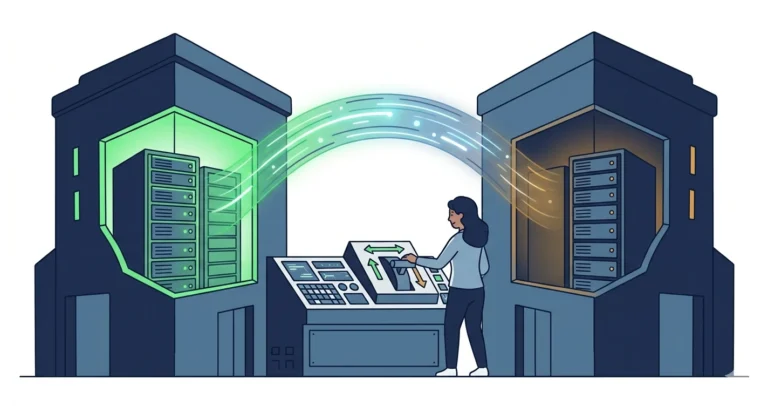
What Is a Distributed AG?
A Distributed Availability Group (DAG) is an AG of AGs. It connects two independent Availability Groups, each in its own WSFC, and replicates data between them at the AG level rather than the database level.
The key architectural difference from a regular AG: there is no shared cluster. Each site has its own WSFC, its own AG, and its own set of replicas. The DAG sits on top and orchestrates replication between the two AGs using a dedicated endpoint.
The Architecture
A typical DAG deployment has three roles:
Global primary is the AG that currently owns the read-write databases. All application writes go here. The global primary ships log records to the forwarder.
Forwarder is the primary replica of the secondary AG. It receives log records from the global primary and distributes them to its own local secondary replicas. The forwarder does not accept direct writes; it is a relay.
Local secondaries are the readable secondary replicas within each AG. They receive their log records from their own AG’s primary, not directly from the global primary.
This layered design is what allows DAGs to cross cluster boundaries. The two AGs do not need to share a WSFC, Active Directory domain, or even network subnet. They communicate through a single TCP endpoint.
Why Not Just Stretch a Regular AG?
You can stretch a regular AG across sites by adding remote replicas in the same WSFC. But this has problems:
Cluster quorum gets complicated. A WSFC that spans two data centers needs a witness or vote configuration that can survive losing an entire site. Getting quorum right across a WAN is a source of outages.
All replicas share one AG. If the AG has five replicas (three local, two remote), every failover decision involves all five. A network partition between sites can cause the AG to go offline even though the local replicas are healthy.
No independent management. You cannot patch, upgrade, or restructure the remote replicas without coordinating with the primary site’s WSFC.
A DAG avoids all of these because each site has its own independent cluster. The sites are loosely coupled: if the link between them goes down, the primary site continues serving traffic and the secondary site falls behind, but neither site’s cluster stability is affected.
Failover: Why It Says FORCE_FAILOVER_ALLOW_DATA_LOSS
This is the part that alarms people.
When you fail over a Distributed AG, the syntax requires FORCE_FAILOVER_ALLOW_DATA_LOSS. There is no planned failover option. The command looks like this:
|
1 2 |
ALTER AVAILABILITY GROUP [dag-name] FORCE_FAILOVER_ALLOW_DATA_LOSS; |
The name is misleading for planned failovers. In a planned scenario (DR test, site maintenance), you are not actually losing data. The “force” verb survives in the syntax because the two AGs are independent entities with no shared cluster arbitration, so there is no single planned-failover command the way there is inside one AG. What you do instead is demote the global primary to a secondary, then promote the forwarder. On SQL Server 2022 and later the engine will guard that promotion so it cannot lose a committed transaction. The failover is coordinated; it just uses a demote-then-promote sequence rather than a one-line planned failover.
The key to a safe planned failover is LSN verification: confirm that the secondary AG has received and hardened every log record from the primary before you issue the failover command. If the LSNs match, the failover is lossless despite the syntax.
The SQL Server 2022 Way: An Engine-Enforced Guarantee
On SQL Server 2019 and earlier, the only thing standing between you and data loss during a Distributed AG failover is your own LSN check. You set both AGs to synchronous commit, compare last_hardened_lsn per database on each side, and proceed only when they match. The syntax still says FORCE_FAILOVER_ALLOW_DATA_LOSS, and it means it: nothing in the engine stops you from promoting a forwarder that is behind.
SQL Server 2022 closed that gap. The distributed availability group now supports REQUIRED_SYNCHRONIZED_SECONDARIES_TO_COMMIT. Set it to 1 before the failover, and the forwarder refuses to complete the promotion unless it has hardened every committed transaction from the global primary. The guarantee moves out of your runbook and into the engine.
|
1 2 3 |
/* SQL Server 2022+ : require the secondary to be caught up before failover */ ALTER AVAILABILITY GROUP [distributedAG] SET (REQUIRED_SYNCHRONIZED_SECONDARIES_TO_COMMIT = 1); |
The full SQL Server 2022 sequence is: set both AGs to synchronous commit, wait for SYNCHRONIZED, set REQUIRED_SYNCHRONIZED_SECONDARIES_TO_COMMIT = 1 on the global primary, demote the global primary with SET (ROLE = SECONDARY), then run FORCE_FAILOVER_ALLOW_DATA_LOSS on the forwarder. Afterward, set REQUIRED_SYNCHRONIZED_SECONDARIES_TO_COMMIT back to 0 on the new forwarder.
|
1 2 3 4 5 6 7 8 9 |
/* 1. demote the global primary (the DAG goes briefly unavailable) */ ALTER AVAILABILITY GROUP [distributedAG] SET (ROLE = SECONDARY); /* 2. promote the forwarder; with the guard set, this cannot lose data */ ALTER AVAILABILITY GROUP [distributedAG] FORCE_FAILOVER_ALLOW_DATA_LOSS; /* 3. on the new forwarder (the old global primary), clear the guard */ ALTER AVAILABILITY GROUP [distributedAG] SET (REQUIRED_SYNCHRONIZED_SECONDARIES_TO_COMMIT = 0); |
The FORCE_FAILOVER_ALLOW_DATA_LOSS syntax is unchanged, so the command still looks alarming. The difference is that on SQL Server 2022 and later, with the guard in place, the engine will not let it do what its name threatens. On 2019 and earlier you do not have that backstop, so the manual LSN check is not optional.
A Scripted Failover Runbook
Running a DAG failover by hand, typing ALTER statements and checking LSNs manually, is a recipe for mistakes at 2 AM. A scripted approach with validation gates at each step is significantly safer.
Here is the general flow:
Step 1: Verify you are on the primary. Query sys.dm_hadr_availability_group_states to confirm the current global primary. If you are on the wrong replica, stop immediately.
Step 2: Switch to synchronous commit. DAGs typically run in asynchronous commit mode for performance. Before a planned failover, switch to synchronous:
|
1 2 3 4 |
ALTER AVAILABILITY GROUP [dag-name] MODIFY AVAILABILITY GROUP ON 'ag-primary' WITH (AVAILABILITY_MODE = SYNCHRONOUS_COMMIT) , 'ag-secondary' WITH (AVAILABILITY_MODE = SYNCHRONOUS_COMMIT); |
Step 3: Wait for synchronization. Poll sys.dm_hadr_availability_group_states until synchronization_health_desc shows HEALTHY on both sides. This confirms the secondary has caught up.
Step 4: Compare LSNs. Query sys.dm_hadr_database_replica_states on both the primary and secondary to compare last_hardened_lsn. If they match, you are safe to proceed. If they do not match, wait and re-check.
Step 5: Disable application logins. Prevent new connections to avoid writes during the failover window.
Step 6 (SQL Server 2022+): Arm the engine guard. On the global primary, set REQUIRED_SYNCHRONIZED_SECONDARIES_TO_COMMIT = 1 so the forwarder cannot be promoted while it is behind. Skip this on SQL Server 2019 and earlier; there the LSN check in Step 4 is your only guarantee.
Step 7: Demote the global primary. Run ALTER AVAILABILITY GROUP ... SET (ROLE = SECONDARY) on the global primary. The DAG is briefly unavailable from this point until the promotion completes.
Step 8: Promote the forwarder. Run ALTER AVAILABILITY GROUP ... FORCE_FAILOVER_ALLOW_DATA_LOSS on the secondary AG. It becomes the new global primary.
Step 9 (SQL Server 2022+): Clear the engine guard. On the new forwarder (the old global primary), set REQUIRED_SYNCHRONIZED_SECONDARIES_TO_COMMIT = 0.
Step 10: Update DNS. If your applications connect through a DNS CNAME, update it to point to the new primary. Automated DNS updates (via the DnsServer PowerShell module) are preferable to calling the NOC at 2 AM.
Step 11: Re-verify LSNs. Confirm the new primary has the expected LSNs. This is your post-failover sanity check.
Step 12: Switch back to asynchronous commit (if that is your normal operating mode).
Step 13: Re-enable application logins.
Each step should include a validation check, and the script should abort if any check fails. A StopAtStep parameter lets you rehearse individual steps without running the entire sequence.
The FileStream Gotcha: Trace Flag 5597
SQL Server 2019 introduced an enhancement for Distributed AGs: dual TCP connections between the global primary and the forwarder, improving log shipping throughput. This behavior continues in SQL Server 2022 and later.
This is a great optimization unless your databases use FileStream.
The problem: with two TCP connections, log records and FileStream file data can arrive at the forwarder out of order. The forwarder tries to apply a log record that references a FileStream file that has not arrived yet, producing SUSPEND_FROM_CAPTURE errors with OS error 2 (“file not found”). The database on the secondary suspends, and replication stops.
The fix is Trace Flag 5597, which reverts the dual-connection enhancement back to single-stream behavior. Apply it as a startup trace flag (-T5597) on any replica that could be a global primary or forwarder, then restart the instance.
This is an undocumented trace flag. It does not appear in Microsoft’s official trace flag reference. Credit to Sean Gallardy for documenting it.
Operational Lessons
A few things I have learned from running DAG failovers in production:
Rehearse the failover before you need it. A DR test under controlled conditions is where you discover that your DNS TTL is too high, your sync wait is too short, or your login disable script misses a service account.
Automate the validation, not just the commands. The failover ALTER statements are trivial. The value of a scripted runbook is the validation gates: am I on the right replica? Are the LSNs equal? Did DNS propagate? Those checks are what prevent you from failing over in the wrong direction or cutting over before replication has caught up.
Keep sync wait time realistic. Switching from asynchronous to synchronous commit and waiting for the secondary to catch up takes time under production load. A 15-second wait might be fine during a low-traffic DR test, but under heavy write workloads you may need minutes. Monitor last_hardened_lsn convergence rather than relying on a fixed timer.
DNS TTL matters. If your CNAME has a 300-second TTL, applications will keep connecting to the old primary for up to 5 minutes after failover. Set the TTL low (30 seconds) before the failover window, and raise it again afterward.
Login management is part of the failover. If you fail over without disabling logins on the old primary, applications with cached connections may continue writing to the wrong server. Disable logins before the failover, enable them on the new primary after DNS propagates.
Monitoring Your DAGs
If you are running Availability Groups or Distributed AGs in production, you need visibility into synchronization state, LSN lag, and replica health without manually querying DMVs. SqlServerAgMonitor is a free, open-source, cross-platform desktop application I built for exactly that: real-time monitoring and management of AGs and DAGs.
Wrapping Up
Distributed Availability Groups solve a real problem: cross-cluster, cross-site replication without the headaches of stretching a single WSFC. The failover syntax is alarming (FORCE_FAILOVER_ALLOW_DATA_LOSS), but with LSN verification and a scripted runbook, planned failovers are reliably lossless.
In a follow-up post, we build a complete PowerShell and sqlcmd script that wires all of these steps together into a single orchestrated failover, with validation gates, parameterized targets, and a stop-at-step mechanism for rehearsal.
If you are running FileStream on SQL Server 2019 or newer with a DAG, investigate TF 5597 before it bites you in production.
If you have war stories from DAG failovers, I would like to hear them. You can find me on Bluesky and LinkedIn.