
Idempotent Data Patches in SQL Server: A Change Tracking Pattern for DACPAC Deployments
If you deploy your SQL Server databases with SSDT or DACPACs via SqlPackage, you have probably run into this problem: the schema deployment is repeatable, but the data patches are not.
SSDT handles CREATE TABLE, ALTER PROCEDURE, and every other schema object with a declarative model. Run the deployment ten times and you get the same schema. But the post-deployment script runs every time too, and if it contains INSERT or UPDATE statements, you either duplicate data or you wrap everything in IF NOT EXISTS checks that grow into an unreadable mess.
We solved this years ago with a small set of objects that give every data patch a name, a guard, and an audit trail. The pattern has survived hundreds of deployments across multiple environments without a single accidental re-application.
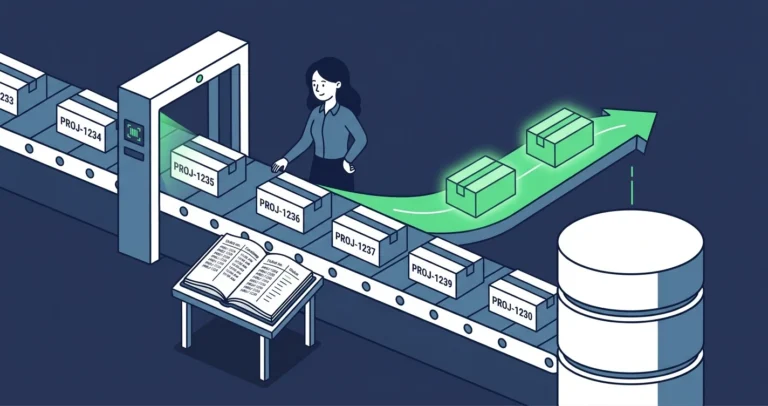
The Problem
Post-deployment scripts in SSDT run unconditionally. Every sqlpackage /Action:Publish executes the entire post-deployment entry point. If your script inserts a row, it inserts it again on the next deploy. If it updates a column, it overwrites whatever value is there now, even if someone changed it intentionally.
The typical workaround is ad-hoc guard clauses:
|
1 2 3 4 |
IF NOT EXISTS (SELECT 1 FROM [config].[setting] WHERE [name] = N'MaxRetries') BEGIN INSERT INTO [config].[setting] ([name], [value]) VALUES (N'MaxRetries', N'3'); END; |
This works for one or two patches. After a year of deployments, your post-deployment script is hundreds of lines of nested IF blocks with no consistency, no audit trail, and no way to tell which patches have run in which environment.
The Solution: A Dedicated Change Tracking Schema
The pattern uses four objects in a dedicated schema (we use [deploy], but any name works):
1. The Registry Table
|
1 2 3 4 5 6 7 8 9 10 11 12 13 |
CREATE TABLE [deploy].[change_tracking] ( [change_tracking_key] int NOT NULL IDENTITY(-2147483648, 1) CONSTRAINT [change_tracking_pk] PRIMARY KEY CLUSTERED , [item_name] nvarchar(128) NOT NULL , [item_value] nvarchar(128) NOT NULL , [created_on] datetime2(3) NOT NULL DEFAULT (GETDATE()) , [updated_on] datetime2(3) NOT NULL DEFAULT (GETDATE()) ); |
Every patch gets an [item_name] (the ticket number or patch identifier) and an [item_value] (typically N'patched', but you can version it). The identity starts at the int data type’s minimum value because why start half way through the range of possible values.
2. The Guard Function
|
1 2 3 4 5 6 7 8 9 10 11 12 13 14 15 16 17 18 19 20 21 22 23 24 25 |
CREATE FUNCTION [deploy].[change_exists] ( @item_name nvarchar(128) , @item_value nvarchar(128) ) RETURNS bit AS BEGIN RETURN ( SELECT CONVERT(bit , CASE WHEN EXISTS ( SELECT 1 FROM [deploy].[change_tracking] [ct] WHERE [ct].[item_name] = @item_name AND [ct].[item_value] = @item_value ) THEN 1 ELSE 0 END ) ); END; |
Every patch script calls this function at the top. If it returns 1, the patch has already been applied and the entire block is skipped.
3. The Registration Procedure
|
1 2 3 4 5 6 7 8 9 10 11 12 13 14 15 16 17 18 19 20 21 22 23 24 25 26 27 28 29 30 31 32 33 34 35 36 37 38 39 40 41 42 43 44 45 46 47 48 49 50 51 52 53 54 |
CREATE PROCEDURE [deploy].[track_change] ( @item_name nvarchar(128) , @item_value nvarchar(128) , @change_tracking_key int = NULL OUTPUT ) AS BEGIN SET NOCOUNT ON; SET XACT_ABORT ON; DROP TABLE IF EXISTS #change_tracking_output; CREATE TABLE #change_tracking_output ( [change_tracking_key] int NOT NULL ); MERGE INTO [deploy].[change_tracking] [destination] USING ( SELECT [item_name] = @item_name , [item_value] = @item_value ) [source] ON [destination].[item_name] = [source].[item_name] WHEN NOT MATCHED BY TARGET THEN INSERT ( [item_name] , [item_value] ) VALUES ( @item_name , @item_value ) WHEN MATCHED THEN UPDATE SET [destination].[item_value] = @item_value , [destination].[updated_on] = GETDATE() OUTPUT [inserted].[change_tracking_key] INTO #change_tracking_output ( [change_tracking_key] ); SET @change_tracking_key = ( SELECT TOP(1) [cto].[change_tracking_key] FROM #change_tracking_output [cto] ); END; |
The MERGE handles both first-run (INSERT) and re-run (UPDATE) cases. The OUTPUT clause captures the key for use in the audit log.
4. The Audit Log Table
|
1 2 3 4 5 6 7 8 9 10 11 12 |
CREATE TABLE [deploy].[change_log] ( [change_log_key] int NOT NULL IDENTITY(-2147483647, 1) PRIMARY KEY CLUSTERED , [change_tracking_key] int NOT NULL INDEX [change_log_tracking_key_ix] , [key_object] nvarchar(396) NOT NULL , [key_value] int NOT NULL , [change_type] tinyint NOT NULL , [log_entry] nvarchar(4000) NOT NULL ); |
This table records what each patch actually did: which table ([key_object]), which row ([key_value]), what kind of change ([change_type]: 1=insert, 2=update, 3=delete), and a human-readable description ([log_entry]).
The Pattern in Action
Here is a complete data patch script that follows the pattern. This example adds a configuration setting and logs the change:
|
1 2 3 4 5 6 7 8 9 10 11 12 13 14 15 16 17 18 19 20 21 22 23 24 25 26 27 28 29 30 31 32 33 34 35 36 37 38 39 40 41 42 43 44 45 46 47 48 49 50 51 52 53 54 55 56 57 58 59 60 61 62 63 64 65 |
SET XACT_ABORT ON; SET NOCOUNT ON; DECLARE @item_name nvarchar(128) = N'PROJ-1234-AddMaxRetries'; DECLARE @item_value nvarchar(128) = N'patched'; DECLARE @commit bit = 1; IF [deploy].[change_exists](@item_name, @item_value) = 0 BEGIN DECLARE @change_tracking_key int; DECLARE @msg nvarchar(2048); BEGIN TRANSACTION; MERGE INTO [config].[setting] [target] USING ( SELECT [name] = N'MaxRetries' , [value] = N'3' ) [source] ON [target].[name] = [source].[name] WHEN NOT MATCHED THEN INSERT ([name], [value]) VALUES ([source].[name], [source].[value]) WHEN MATCHED AND [target].[value] <> [source].[value] THEN UPDATE SET [target].[value] = [source].[value] OUTPUT @item_name , INSERTED.[setting_id] , CASE $action WHEN 'INSERT' THEN CONVERT(tinyint, 1) WHEN 'UPDATE' THEN CONVERT(tinyint, 2) END , $action + N': [name]=' + INSERTED.[name] + N' [value]=' + INSERTED.[value] INTO [deploy].[change_log] ( [key_object] , [key_value] , [change_type] , [log_entry] ); IF XACT_STATE() = 1 AND @commit = 1 BEGIN EXEC [deploy].[track_change] @item_name = @item_name , @item_value = @item_value , @change_tracking_key = @change_tracking_key OUTPUT; COMMIT TRANSACTION; SET @msg = N'Committed: ' + @item_name; RAISERROR(@msg, 0, 1) WITH NOWAIT; END ELSE BEGIN ROLLBACK TRANSACTION; SET @msg = N'Rolled back: ' + @item_name; RAISERROR(@msg, 0, 1) WITH NOWAIT; END; END ELSE BEGIN DECLARE @skip_msg nvarchar(256) = N'Skipping (already applied): ' + @item_name; RAISERROR(@skip_msg, 0, 1) WITH NOWAIT; END; |
Run this script ten times. The first run inserts the setting row, logs the change, and registers the patch. Runs two through ten print “Skipping (already applied)” and do nothing.
Why This Works Better Than Ad-Hoc Guards
Consistency. Every patch follows the same structure. New team members copy an existing patch, change the ticket number and the DML, and they are done. There is no ambiguity about how to make a patch idempotent.
Auditability. The [change_tracking] table tells you exactly which patches have run in any environment. The [change_log] table tells you what each patch did, down to the row level. When someone asks “did the PROJ-1234 fix get deployed to production?”, you query one table.
Atomicity. The guard check and the registration happen inside the same transaction. If the DML fails and the transaction rolls back, the patch is not registered and will retry on the next deployment.
Visibility. The RAISERROR ... WITH NOWAIT calls produce real-time output during deployment. You can watch sqlpackage run and see exactly which patches are executing and which are being skipped. No guessing.
Operational Queries
Once the pattern is in place, environment comparison becomes trivial:
|
1 2 3 4 5 6 7 8 9 10 |
/* What patches have run in this environment? */ SELECT [ct].[item_name] , [ct].[item_value] , [ct].[created_on] , [ct].[updated_on] FROM [deploy].[change_tracking] [ct] ORDER BY [ct].[created_on] DESC; |
|
1 2 3 4 5 6 7 8 9 10 11 12 |
/* What rows did a specific patch modify? */ SELECT [cl].[key_object] , [cl].[key_value] , [cl].[change_type] , [cl].[log_entry] FROM [deploy].[change_log] [cl] INNER JOIN [deploy].[change_tracking] [ct] ON [cl].[change_tracking_key] = [ct].[change_tracking_key] WHERE [ct].[item_name] = N'PROJ-1234-AddMaxRetries'; |
Tips for Adopting This Pattern
Name patches after tickets. Use your issue tracker ID as the [item_name]. This creates a direct link between the deployment log and the work item that motivated the change.
Use the @commit flag for testing. Set @commit = 0 to test a patch without persisting. The script runs the DML, prints the output, and rolls back. Change it to 1 when you are ready to deploy for real.
Keep the [deploy] schema in your SSDT project. The four objects are part of the database schema. They deploy with the DACPAC and are version-controlled like everything else.
Do not delete rows from [change_tracking]. The table is an audit trail. If you need to re-run a patch (rare), update the [item_value] to something like N'reset' so the guard no longer matches, and the original registration is preserved.
This pattern has been running in production across multiple environments for several years. It is not clever or fancy. It is a small amount of infrastructure that eliminates an entire class of deployment problems.
Have questions about idempotent deployments or DACPAC post-deployment scripts? Let me know on Bluesky or LinkedIn.