
One System Should Drive the Work, Not Several Driving You
Picture a week spent almost entirely on tickets that ends with a board where nothing has moved. Anyone reading the board that Friday would conclude the DBA had done very little. The work is real, but it lives in the ticket system, and the board has no record of it.
This post is part of the Work That Flows: Kanban for DBAs series. The contents page lists every part in order.
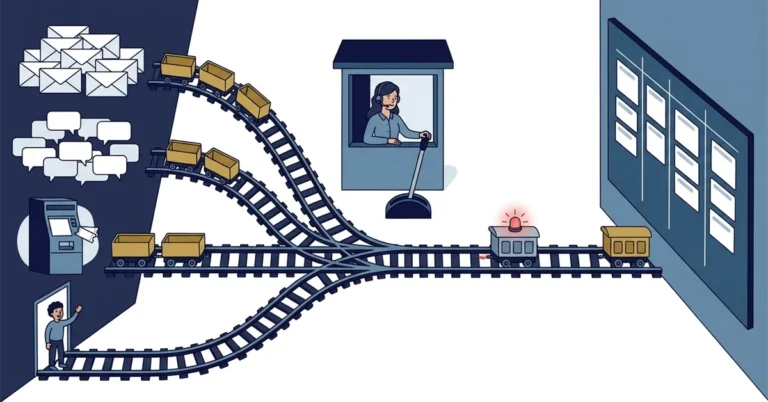
My view, and this whole post is opinion, is that a DBA should use a single system to drive the work, instead of having several ways for the work to drive them. A ticket system that isn’t integrated with the Kanban board can subvert the work a successful DBA does, because most of that work never shows up where the team plans. In Agility Comes From the Pipeline, Not the Ceremony I said Kanban suits DBA work better than a fixed sprint. This part is about what happens to the board when a second system hands the DBA work that the board can’t see.
Incident Time Doesn’t Reach the Board
A common setup looks like this. Project work and planned changes live on the board. Incidents, access requests and “can you look at this query” live in the ticket system, which the service desk triages. Often nobody designed the split. Different groups adopted the two systems at different times, for different reasons.
The Kanban Guide says work in an organization is often hidden, and that making it visible improves transparency.[1] DORA’s guidance on work in process (WIP) limits lists “not counting invisible work” as a common pitfall, and separately says WIP limits should account for activities like production support.[2] For a DBA, production support can be a large part of the week. When tracing a blocking chain on SQLPROD01 to its cause takes Tuesday afternoon, the board shows the index maintenance card in “In progress” for another day with no change. Its lead time grows, and the reason lives only in a system the board doesn’t read.
So the board shows a DBA who looks idle while handling incidents, and a project card that looks stalled for no visible reason. Neither reading is accurate, and people tend to repeat both in status meetings.
Two Ideas of Priority
A typical ticket system ranks work by severity and by how much time is left on the SLA timer. The board ranks work by its position in the column and by the WIP limits. Each ranking makes sense inside its own system. When the two disagree, there’s usually no rule that says which one wins.
Without an agreed rule, the escalation tends to win. Whoever calls the DBA’s manager, or puts “URGENT” in the subject line, gets the next hour. That’s push scheduling, with the order set by whoever asked hardest. The Kanban Guide describes the alternative, a pull system where new work starts only when the WIP limit shows there’s capacity, and it contrasts that with the push scheduling of traditional project management.[1]
Kanban does have a place for urgent work. The Guide describes an “expedite” class of service, with agreed rules for which items qualify, that may pass through the system even when the WIP limit is full.[1] The difference from an escalation is that the team agrees the expedite rules before the urgent work arrives, rather than deciding each case on the phone.
WIP Limits Stop Meaning Much
Say the board has a WIP limit of three on “In progress”, to stop you starting a fourth thing. If the ticket system assigns you ten more tickets, and three of them have SLA clocks running, your real work in progress is closer to thirteen than three. The limit applies to the board and not to the queue next to it.
The Guide says limiting WIP reduces delay and context switching.[1] With most of the queue outside the limit, a DBA still switches between tickets all day, and the board’s limit only governs the project cards.
Double Entry and Drift
The usual workaround is to copy work across by hand: the ticket gets a card, and the card gets a link to the ticket. Then someone updates one of them and not the other. Someone closes a ticket while the card is still in “Review”, and a card reaches Done while the ticket still waits on the customer.
After a few weeks, the ticket system’s report says one thing about the DBA’s workload and the board’s charts say another. Neither one is reliable without reconciling them by hand. The Guide lists lead time, delivery rate and WIP as core Kanban metrics.[1] When the board tool records them, they only count the cards on the board.
Email, Chat and the Hallway
Then there are the requests that never touch either system. A chat message asks for read access on the reporting database. An email arrives addressed to the DBA, with their manager copied. Someone stops the DBA in the hallway with “while I’ve got you”. Each of those is another intake channel with its own unwritten priority, which makes three or four systems, not two.
One step in the Guide’s STATIK approach to designing a Kanban system is analyzing demand, including the channels customers use to make requests.[1] If you list your own channels honestly, the list may be longer than you expect.
What the Ticket System Is For
I’m not arguing to get rid of the ticket system. IT service management tooling exists for good reasons. An SLA is a documented agreement on response and resolution times, and one of its stated purposes is to set the urgency of requests so a team isn’t “reacting to whoever is loudest.”[3] ITIL defines the service desk as the single point of contact between the service provider and its users.[4] Change management depends on tracking changes so there’s an auditable record.[5] A board isn’t designed to do those jobs, and I wouldn’t want it to.
The ticket system can record the work, time it against the SLA, and keep the audit trail. One system has to decide what I work on next, and in my view that’s the board.
What Can Help
Connect the two. If your tools let you integrate the ticket system with the board, so that a ticket assigned to the DBA team creates or updates a card, do that first. It removes most of the double entry. The card carries the ticket number, so the SLA timer and the audit trail stay in the ticket system.
A one-way rule. Without an integration, a written policy does much of the same job: every ticket gets a card before any work starts on it, and the board decides what’s next. Incidents still go first, as expedite cards under the agreed rules. Tickets flow onto the board, and the ticket queue doesn’t reorder the board. The Kanban Guide recommends making policies like this explicit, agreed by everyone involved and posted next to the board.[1]
A single front door. When a request arrives by email or chat, consider replying with a link to the ticket form, and starting the work once the ticket exists. This depends on doing it every time, and politely. DORA suggests a weekly meeting where stakeholders put all the work in priority order.[2] When all the work is on one board that requesters can see, you may not need that meeting at all. The board I work from is visible to the people who request work, so they can see the order for themselves, and challenging it is up to them.
Where I Land
When the ticket system and the board both decide what a DBA does next, the louder request usually wins, and the board’s limits and metrics stop describing the week. I’d keep the ticket system for SLAs, audit and the service desk. I’d put every piece of work on the board, and let the board set the order.
Some teams never use a board at all, and all their work arrives through tickets and inboxes. The next part of the series (available 2026-11-28) is about those teams.
If you run a ticket system and a board side by side, I’d like to hear how you keep them in step. Tell me on Bluesky or LinkedIn.
Previous: One DBA, Six Boards: When Kanban Gets Split Across Teams. Next: Fit the Process to the People: Working With Teams That Never Use a Board (available 2026-11-28).
References
- The Kanban Guide - Kanban University. Says work in organizations is often hidden and that visualizing it improves transparency, that limiting WIP reduces delay and context switching, and contrasts pull systems with push scheduling. Describes the expedite class of service, which may pass through even when the WIP limit is reached, explicit policies agreed by everyone and placed next to the board, the core metrics (lead time, delivery rate and WIP), and the STATIK step of analyzing demand, including request channels. ↩
- Work in process limits - DORA. Lists “not counting invisible work” as a common pitfall, says WIP limits should account for activities like production support, and suggests a weekly meeting for stakeholders to prioritize all work in order. ↩
- What is an SLA? - Atlassian. Defines an SLA as a documented agreement covering metrics such as response and resolution time, and says SLAs define the urgency of incoming requests so teams can focus on what matters most “rather than reacting to whoever is loudest.” ↩
- What is ITSM? - Atlassian. Quotes ITIL’s definition of a service desk as “the single point of contact between the service provider and the users”, which manages incidents and service requests. ↩
- IT change management - Atlassian. Describes change management as categorizing, assessing, approving and reviewing changes, and says change and risk management require tracking and linking changes to provide an auditable record. ↩